## Only need to configure when remote login is required # user: # username: your username # password: your password if need # key_file: your ssh-key file path if need # port: your ssh port, default 22 # timeout: ssh connection timeout (second), default 30 oceanbase-ce: servers: - name: z1 # Please don't use hostname, only IP can be supported ip: 192.168.1.2 - name: z2 ip: 192.168.1.3 - name: z3 ip: 192.168.1.4 global: # The working directory for OceanBase Database. OceanBase Database is started under this directory. This is a required field. home_path: /root/observer # The directory for data storage. The default value is $home_path/store. # data_dir: /data # The directory for clog, ilog, and slog. The default value is the same as the data_dir value. # redo_dir: /redo # External port for OceanBase Database. The default value is 2881. # mysql_port: 2881 # Internal port for OceanBase Database. The default value is 2882. # rpc_port: 2882 # Defines the zone for an observer. The default value is zone1. # zone: zone1 # The maximum running memory for an observer. When ignored, autodeploy calculates this value based on the current server available resource. # memory_limit: 58G # The percentage of the maximum available memory to the total memory. This value takes effect only when memory_limit is 0. The default value is 80. # memory_limit_percentage: 80 # The reserved system memory. system_memory is reserved for general tenants. The default value is 30G. Autodeploy calculates this value based on the current server available resource. # system_memory: 22G # The size of a data file. When ignored, autodeploy calculates this value based on the current server available resource. # datafile_size: 200G # The percentage of the data_dir space to the total disk space. This value takes effect only when datafile_size is 0. The default value is 90. # datafile_disk_percentage: 90 # System log level. The default value is INFO. # syslog_level: INFO # Print system logs whose levels are higher than WARNING to a separate log file. The default value is true. The default value for autodeploy mode is false. # enable_syslog_wf: false # Enable auto system log recycling or not. The default value is false. The default value for autodeploy mode is on. # enable_syslog_recycle: true # The maximum number of reserved log files before enabling auto recycling. When set to 0, no logs are deleted. The default value for autodeploy mode is 4. # max_syslog_file_count: 4 # Cluster name for OceanBase Database. The default value is obcluster. When you deploy OceanBase Database and obproxy, this value must be the same as the cluster_name for obproxy. # appname: obcluster # Password for root. The default value is empty. # root_password: # Password for proxyro. proxyro_password must be the same as observer_sys_password. The default value is empty. # proxyro_password: z1: zone: zone1 z2: zone: zone2 z3: zone: zone3 obproxy: servers: - 192.168.1.5 global: # The working directory for obproxy. Obproxy is started under this directory. This is a required field. home_path: /root/obproxy # External port. The default value is 2883. # listen_port: 2883 # The Prometheus port. The default value is 2884. # prometheus_listen_port: 2884 # rs_list is the root server list for observers. The default root server is the first server in the zone. # The format for rs_list is observer_ip:observer_mysql_port;observer_ip:observer_mysql_port. # Ignore this value in autodeploy mode. # rs_list: 127.0.0.1:2881 # Cluster name for the proxy OceanBase Database. The default value is obcluster. This value must be set to the same with the appname for OceanBase Database. # cluster_name: obcluster # Password for obproxy system tenant. The default value is empty. # obproxy_sys_password: # Password for proxyro. proxyro_password must be the same with proxyro_password. The default value is empty. # observer_sys_password:
1 2 3 4 5 6 7
## Only need to configure when remote login is required # user: # username: your username # password: your password if need # key_file: your ssh-key file path if need # port: your ssh port, default 22 # timeout: ssh connection timeout (second), default 30
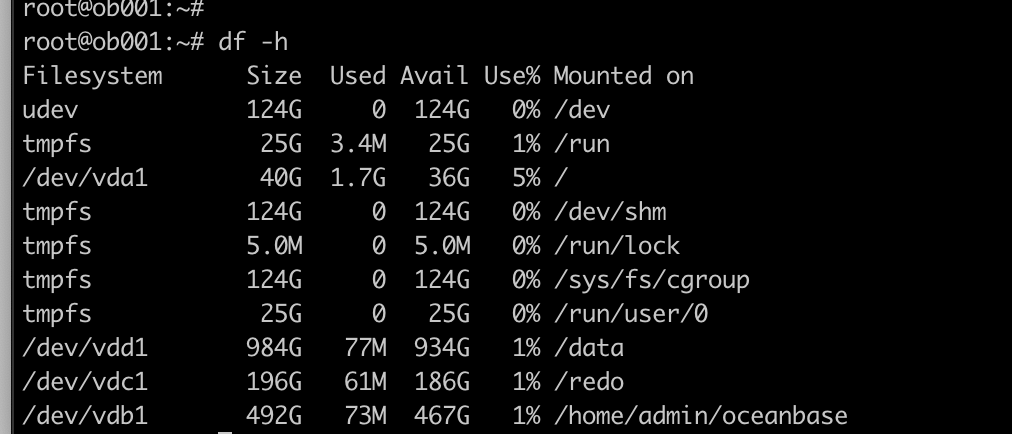
oceanbase-ce: servers: - name: z1 # Please don't use hostname, only IP can be supported ip: 172.30.62.200 - name: z2 ip: 172.30.62.201 - name: z3 ip: 172.30.62.202 global: # The working directory for OceanBase Database. OceanBase Database is started under this directory. This is a required field. home_path: /home/admin/oceanbase/ob # The directory for data storage. The default value is $home_path/store. data_dir: /data/ob # The directory for clog, ilog, and slog. The default value is the same as the data_dir value. redo_dir: /redo/ob
配置proxy, 修改ip 和home_path
1 2 3 4 5 6
obproxy: servers: - 172.30.62.203 global: # The working directory for obproxy. Obproxy is started under this directory. This is a required field. home_path: /home/admin/oceanbase
admin@obdriver:~$ obd cluster display obtest Get local repositories and plugins ok Open ssh connection ok Cluster status check ok Connect to observer ok Wait for observer init ok +-------------------------------------------------+ | observer | +---------------+---------+------+-------+--------+ | ip | version | port | zone | status | +---------------+---------+------+-------+--------+ | 172.30.62.200 | 3.1.0 | 2881 | zone1 | active | | 172.30.62.201 | 3.1.0 | 2881 | zone2 | active | | 172.30.62.202 | 3.1.0 | 2881 | zone3 | active | +---------------+---------+------+-------+--------+
Connect to obproxy ok +-------------------------------------------------+ | obproxy | +---------------+------+-----------------+--------+ | ip | port | prometheus_port | status | +---------------+------+-----------------+--------+ | 172.30.62.203 | 2883 | 2884 | active | +---------------+------+-----------------+--------+
admin@obdriver:~$ mysql -h${obproxy_ip} -P${obproxy_port} -uroot Welcome to the MariaDB monitor. Commands end with ; or \g. Your MySQL connection id is 2 Server version: 5.6.25 OceanBase 3.1.0 (r3-b20901e8c84d3ea774beeaca963c67d7802e4b4e) (Built Aug 10 2021 07:51:04)
Copyright (c) 2000, 2018, Oracle, MariaDB Corporation Ab and others.
Type 'help;' or '\h' for help. Type '\c' to clear the current input statement.
MySQL [(none)]> use oceanbase; Reading table information for completion of table and column names You can turn off this feature to get a quicker startup with -A
-- 配置转储50次 ALTER SYSTEM SET minor_freeze_times = 50;
-- 转储触发水位百分比,建议256G以上配置调整为70,256G以下调整为60 ALTER SYSTEM SET freeze_trigger_percentage = '60';
-- 数据拷贝并发为100 ALTER SYSTEM SET data_copy_concurrency = 100; -- 服务器上数据传出并发为10 ALTER SYSTEM SET server_data_copy_out_concurrency = 10; -- 服务器上数据传入并发为10 ALTER SYSTEM SET server_data_copy_in_concurrency = 10;
-- 转储预热时间,默认30s,设置了会延后转储释放的时间,改成0s ALTER SYSTEM SET minor_warm_up_duration_time = '0s'; -- 配置chunk内存大小(建议保持默认值0,ob自行分配) ALTER SYSTEM SET memory_chunk_cache_size = 0;
-- 最大包括版本数量,影响磁盘可用空间,默认为2,将多保留一个版本的数据在数据盘中,需调整为1 ALTER SYSTEM SET max_kept_major_version_number = '1'; ALTER SYSTEM SET max_stale_time_for_weak_consistency = '2h';
事务相关
1 2 3 4 5
ALTER SYSTEM SET clog_sync_time_warn_threshold = '1s'; ALTER SYSTEM SET trx_try_wait_lock_timeout = '0ms';(默认就是 0ms,无需修改)
-- 建议关闭一阶段提交,该参数值默认是false ALTER SYSTEM SET enable_one_phase_commit='False';
ALTER TENANT SET PRIMARY_ZONE = 'zone_name1,zone_name2,zone_name3';
租户设置
并发度设置
1 2 3 4 5 6 7 8 9 10 11 12 13
-- 最大并发度,默认32,有大查询业务的建议调整为128 SET GLOBAL ob_max_parallel_degree = 128;
/* parallel_max_servers 推荐设置为测试租户分配的 resource unit cpu 数的 10 倍 如测试租户使用的 unit 配置为:create resource unit $unit_name max_cpu 26 那么该值设置为 260 parallel_server_target 推荐设置为 parallel_max_servers * 机器数*0.8 那么该值为 260*3*0.8=624 */ set global parallel_max_servers=260; set global parallel_servers_target=624;
回收站设置
1 2 3 4 5
-- 回收站参数,ddl执行频率过大的场景一定要关闭,避免ddl执行过多引起租户性能异常
SET GLOBAL recyclebin = 0;

-- truncate回滚参数,truncate执行频率过大的场景一定要关闭
SET GLOBAL ob_enable_truncate_flashback = 0;
alter proxyconfig set sock_option_flag_out = 2;  --  2代表keepalive
alter proxyconfig set server_tcp_keepidle = 5;  --  启动keepalive探活前的idle时间,5秒。
alter proxyconfig set server_tcp_keepintvl = 5;  -- 两个keepalive探活包之间的时间间隔,5秒
alter proxyconfig set server_tcp_keepcnt = 2;  --  最多发送多少个keepalive包,2个。最长5+5*2=15秒发现dead_socket。
alter proxyconfig set server_tcp_user_timeout = 5;  --  等待TCP层ACK确认消息的超时时长,5秒。